Key Takeaways
- A credential for ConnectWise Cloud Backup (formerly SkyKick), a Microsoft 365 backup app, was compromised, according to Huntress, Microsoft and ConnectWise.
- Huntress reports 173 tenants with confirmed unauthorized sign-ins. The credential works against any tenant that consented to the app.
- The attackers signed in as the application, not as a user, so user MFA and user Conditional Access policies were not in the path.
- In at least one partner tenant, a related ConnectWise app added itself to Global Administrator and added secrets to an MSP management app and a security-platform app.
- No threat actor has been named as of October 19, and data theft is not confirmed.
- Check service principal sign-ins and audit logs back to October 13. Disable the Cloud Backup app, but do not delete it, and keep it disabled until ConnectWise confirms its credentials were reset.
What happened to ConnectWise Cloud Backup, and who is affected?
This is a supply-chain attack on a Microsoft 365 backup app. Attackers obtained a credential for ConnectWise Cloud Backup app (formerly SkyKick) and used it, as the app’s service principal (the identity an app uses inside a tenant), to sign in to customer tenants on October 15, 2026.
Reported tactics, techniques, and procedures (TTPs):
- Sign-ins as the app (service principal authentication) from 144.172.64.128 to obtain Microsoft Graph tokens in customer tenants.
- Scripted tenant sweep: sorted GUID order, a few seconds apart (Huntress), with a Python user agent on the suspicious sign-ins.
- In at least one partner tenant, a separate ConnectWise app (Cloud Management for Microsoft Teams) adding itself to the Global Administrator role.
- Client secrets added to an MSP management app and to Huntress’s own security-platform app.
- Separately, password spraying against four law-firm tenants from the same address on October 13 and 14, with no successful user sign-ins reported.
No threat actor has been named in public reporting.
Every element below comes from public reporting by Huntress, Microsoft, Todyl, and ConnectWise. Times are as reported, in UTC.
| Timeline of Compromise | Source | Event | Reported by |
| Oct 13–14 | 144.172.64.128 | Password spraying against four law-firm tenants; no successful user sign-ins observed | Huntress |
| Oct 15, 06:13–08:34 | 144.172.64.128 | Graph tokens obtained in customer tenants through the Cloud Backup app | Huntress |
| Oct 15 | 144.172.64.128 | Broad service principal authentication observed across tenants | Microsoft |
| Date not stated | Python-urllib/3.12 | Script modifies applications in one partner tenant | Huntress |
| Date not stated | Cloud Management for Teams app | Adds itself to Global Administrator in a partner tenant, then adds client secrets to an MSP management app and to Huntress’s security-platform app | Huntress |
| Oct 17 | ConnectWise | Cloud Backup application access disabled until further notice | ConnectWise |
How did the attackers get into Microsoft 365 tenants without a user account?
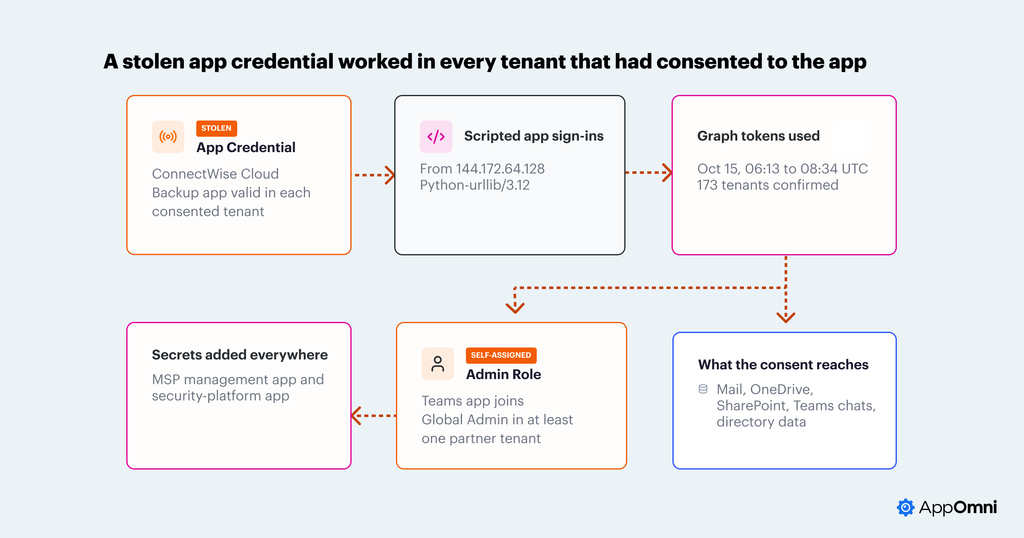
The entry point was the app’s own credential, not a user account or a phished session. Attackers presented ConnectWise’s own credential, received tokens with the permissions customers had already granted, and signed in as the app. How they got the credential has not been disclosed.
What data could attackers reach through the ConnectWise Cloud Backup compromise?
The app’s consent covers mailboxes, OneDrive and SharePoint files, Teams chats and directory data in every tenant where it is installed, so the credential could read all of it. Public reporting does not confirm that data was exfiltrated. Huntress notes that some Graph directory reads leave no audit trail, which limits what customers can rule out from logs alone.
Some changes were made rather than read: in at least one partner tenant, a Global Administrator role assignment and new client secrets on an MSP management app and a security-platform app. The reporting does not describe unsanctioned apps. The apps that signed in were vendor integrations and trusted tools that the affected organizations had already approved.
Why did it work? Why did one vendor credential work across so many tenants?
Five conditions combined, and the first is that a multi-tenant app’s credential is valid wherever the app is installed. It carried broad permissions, and signing in as an app skips user controls:
- One credential, many tenants. A multi-tenant app’s credential is valid in every tenant that consented to the app, so the attacker did not need to compromise tenants one at a time.
- Broad standing permissions. The app holds rights across mail, files, Teams and directory data, and Microsoft says the actor likely abused permissions including Directory.ReadWrite.All.
- App sign-ins skip user controls. Authenticating as a service principal involves no user, no interactive MFA and no user-targeted Conditional Access policy. Entra shows these events on a separate service principal sign-in tab, not in the default user sign-in view.
- Privilege was reachable from inside the app ecosystem. A related ConnectWise app could assign itself Global Administrator in a partner tenant and add secrets to other vendors’ apps.
- Detection depends on logs many tenants do not collect. Graph activity logs must be turned on, and some directory reads reportedly leave no audit trail.
Public reporting does not say whether specific security tools failed to detect the activity. A per-tenant new-IP alert would have seen a single unfamiliar address on a vendor app, which looks routine.
What security teams should take away from the ConnectWise attack?
A vendor’s application identity is part of your attack surface, and it can fail without any of your own accounts being touched. This incident bypassed three common assumptions:
- User controls cover app sign-ins. MFA and user-targeted Conditional Access protect user logins. They do not govern an application signing in on its own.
- Resetting passwords and revoking sessions ends an incident. Here access came from the app’s credential and from secrets added to other apps. Revoking user sessions does not end that access.
- A trusted vendor’s apps stay within their purpose. A ConnectWise app assigned itself an administrator role in a partner tenant.
Treat third-party apps like privileged identities. Know which ones are consented, what each can reach, who owns the vendor relationship, and what normal looks like for each.
What to do right now about the ConnectWise compromise on Microsoft 365 tenants?
Start with what applies to this incident, then build the standing detections.
- Retro-hunt back to October 13. Search service principal sign-ins for 144.172.64.128 and for the ConnectWise app IDs listed in the ConnectWise advisory. Search the audit log for credentials added to service principals and for role assignments made by app identities. Search failed user sign-ins for the same address.
- Confirm containment. Disable, do not delete the Cloud Backup app in your tenant because deleting removes consent. You will need to re-consent to restore service. . Review client secrets on your MSP management and security-tool apps and remove any you cannot attribute. Revoking user sessions does not end app access.
- Make the logs available. Export service principal sign-ins and audit logs to storage you control, enable Microsoft Graph activity logs, and keep at least 90 days.
- Inventory third-party apps and their scopes. List consented apps, who owns each vendor relationship, and which hold broad scopes such as Directory.ReadWrite.All, Mail.ReadWrite or Files.ReadWrite.All. Remove what you do not use.
- Build two alerts: a network never seen for a given app in your tenant, and any credential or role change initiated by an app identity. Hand the evidence to the app owner and the vendor to confirm. A deviation is a question, not a conclusion.
How do you check your own Entra logs for a compromised vendor app?
The threat hunting method below assumes you collect Entra service principal sign-ins, audit logs and Microsoft Graph activity logs in your own SIEM or log platform, with enough history to baseline each app. It takes real engineering effort. If you do not collect those logs, the steps above are the practical place to start.
Why a new-IP alert on a vendor app miss a compromised OAuth app
A new-IP rule asks whether an address is new. For a vendor-managed application the answer is often yes, and usually harmless: vendors change egress ranges, migrate infrastructure and rotate hosting. The rule is right to fire, but an address is the wrong unit. It says nothing about who owns the network or what the app did after it signed in.
The sign-ins are easy to overlook for a second reason: the attacker authenticated as the application, so the events sit on the service principal sign-ins tab in Entra, not in the default user sign-in view (see “Why did it work?”) Two questions work better. Has this app ever signed in from this network, rather than this address? And did the app do anything it has never done, such as adding credentials or taking a directory role? Both can be answered from your own logs, and the second needs no baseline at all.
Your tenant as the baseline
One tenant’s history is enough for the first test. Build a 90-day profile of the networks each application signs in from, using the autonomous system number (ASN) or announced prefix rather than the single IP. Cloud providers rotate addresses constantly and rarely change the network that owns them.
Three filters keep the comparison workable.
- First, use service principal sign-ins only, so the app ID is the account and no inference from user activity is needed.
- Second, keep apps seen on five or fewer networks in your tenant; a wide spread suggests customer-hosted or user-driven traffic.
- Third, for apps hosted in Microsoft’s cloud, add an outside reference: Microsoft publishes Azure IP ranges, and a sign-in from an address outside them is notable on its own. Public reporting says this app’s normal egress is Azure.
The test: in the last day, did any in-scope app sign in from a network it has never used in your tenant? Run it daily. The first token sweep alone ran for under two and a half hours.
Retention is the prerequisite. Entra keeps sign-in logs for a limited time by default, depending on license, so export service principal sign-ins and audit logs to your SIEM or a Log Analytics workspace before you need a 90-day history.
Where this shows up in your logs
The tenants were hit in sorted GUID order, a few seconds apart, and Huntress notes a possible alphabetical targeting affinity. You cannot see that ordering from inside one tenant, and the hunt does not need it. In your tenant the same activity maps to four log sources:
| Log | What to look for | What reporting says it would show |
| Entra service principal sign-ins | Cloud Backup app (App ID 506e08f9-6e9a-4da4-942b-a099a03644ae) signing in from a network outside its history or outside Azure ranges | 144.172.64.128 on Oct 15 |
| Microsoft Graph activity logs | Requests from the app with a first-seen user agent | Python-urllib/3.12 |
| Entra audit log | Credentials added to service principals; app identities added to directory roles | Cloud Management for Teams added itself to Global Administrator; secrets added to an MSP app and a security-platform app |
| Entra user sign-ins (failures) | The same address in failed user sign-ins | Password spraying, Oct 13–14 |
Note: Only the first row needs a baseline. The audit log row needs none to be worth reviewing: an application identity assigning itself a role or adding secrets to other apps is uncommon. It is not always malicious, though. ConnectWise’s own Cloud Management apps were also seen assigning themselves roles in multiple tenants, which may be vendor automation, so confirm with the vendor before you act.
Ranking by what the app did
A first-seen network produces a list, and most of it is noise. Rank by what the app did in your tenant, in this order:
- Directory changes made by an application identity: credentials added to service principals, role assignments and app role grants. A backup or management app rarely does these, so they can alert on their own.
- Graph requests from a first-seen user agent, or to resources the app has not used before.
- A first-seen network with no other deviation.
Then corroborate. If the same address appears in failed user sign-ins, as this one reportedly did on October 13–14, it is not a vendor egress change. If many unrelated apps in your tenant moved to the same new network together, a proxy or migration on your side is the more likely cause. One app on one new network, followed by directory changes, is the shape to escalate.
from collections import defaultdict
from datetime import timedelta

# signins_history: service principal sign-ins from day -90 to day -1
# fields are stand-ins; map them to your SIEM schema
seen = defaultdict(set)
for r in signins_history:
    seen[r.app_id].add(r.asn)

# 1. a network never seen for that app in YOUR tenant (narrow-footprint apps only)
new_net = [
    r for r in signins_last_day
    if len(seen[r.app_id]) <= 5 and r.asn not in seen[r.app_id]
]

# 2. directory changes made by an app identity: alert on these outright
# verify operation names against your own audit log
SENSITIVE = {
    "Add service principal credentials",
    "Update application - Certificates and secrets management",
    "Add member to role",
    "Add app role assignment to service principal",
}
app_changes = [
    e for e in audit_last_day
    if e.operation in SENSITIVE and e.initiated_by_type == "app"
]

# 3. escalate when both come from the same app within six hours
escalate = [
    (n, c) for n in new_net for c in app_changes
    if n.app_id == c.initiator_app_id and abs(c.ts - n.ts) <= timedelta(hours=6)
]
Routine explanations to confirm
Before escalating a first-seen network, rule out the routine causes. Each has a way to confirm.
- Vendor infrastructure migration. A move to new hosting changes the app’s network in every tenant. To confirm: a vendor change notice, a network owned by the vendor’s known hosting provider, and an unchanged operation mix. It would not explain credential or role changes.
- Partner administration. MSPs legitimately add secrets to management apps and rotate credentials. To confirm: a change ticket from your MSP, the initiating identity in the audit log, and a maintenance window.
- Vendor scripting. A stock Python HTTP client is plausible for vendor tooling. To confirm: the vendor’s account of who ran it and from where.
- Your own network change. A proxy or migration shifts many apps at once. To confirm: other apps in your tenant moved to the same new network at the same time. One app on one new network does not fit.
What a routine explanation would still have to account for. A new network on its own is explainable. The combination is harder: an application identity assigning itself Global Administrator, new client secrets on another vendor’s security application, and sign-ins from an address that had been spraying other organizations. From inside one tenant you cannot tell a vendor insider from an outside party holding the credential, and you do not need to. A role change or credential addition by an app identity deserves review whatever the cause.
Limits of the method
- You cannot see the spread. Huntress and Microsoft saw the same address across many tenants. From one tenant that is invisible, which is why the audit log signals matter more than the network signal.
- An operator inside the vendor’s hosting provider looks normal. Reported normal egress for this app is Azure, so an attacker on an Azure virtual machine would blend into an ASN-level baseline. Prefix-level baselines narrow this only if the vendor’s footprint is stable.
- Timing. Tokens were obtained over about two and a half hours on October 15, and issued tokens reportedly remain valid for up to 90 minutes. A weekly review finds this after the access is over. Alerts need to run at least daily, and the response has to disable the app or rotate its credentials, not only revoke user sessions.
- Log coverage. Service principal sign-ins and audit logs must be collected and retained. Graph activity logs have to be turned on, and Huntress notes some Graph directory reads leave no audit trail.
How can AppOmni help detect and respond to a compromised vendor app?
Network signals are weak for vendor apps. The strongest signals in this incident were changes: a role assignment and added credentials made through app identities. AppOmni threat detection reads Microsoft 365 and Entra audit events, which is where those changes are recorded.
The default Microsoft 365 rules include Service Principal Added To Admin Role, a high-severity detection that fires when an application is assigned Global Administrator or another privileged Entra role. That is the escalation step Huntress reported in a partner tenant.
 Follow Me