

Understand shared responsibilities, prevent OAuth abuse, and reduce risks against Salesforce’s low-code environments.
Salesforce is the world’s leading CRM platform, trusted by more than 150,000 organizations to manage customer relationships, sales pipelines, service operations, and financial data. Understanding how to secure Salesforce is critical because, at many enterprises, it stores some of the most sensitive SaaS data—making it a prime target for attackers.
Most Salesforce breaches don’t happen due to platform vulnerability. They happen when environments are misconfigured, permissions grow beyond what’s necessary, or connected applications open new pathways to sensitive records.
AppOmni Labs’ research has identified recurring patterns:
- OAuth abuse by threat actors like UNC6040
- Exploitable low-code misconfigurations, including five publicly disclosed Common Vulnerabilities and Exposures (CVEs)
- Persistent risks from over-permissioned users across enterprise environments
According to AppOmni findings, 75% of organizations experienced a SaaS security incident in the past year, even though 91% believed their security posture was strong. And when breaches do occur, the cost is steep. According to IBM’s 2025 Cost of a Data Breach Report, U.S. organizations now face an average of $10.22 million per incident, a 9% increase from 2024.
Understanding who is responsible for what is the critical first step for securing your Salesforce implementation.
What the Salesforce shared responsibility model means for you
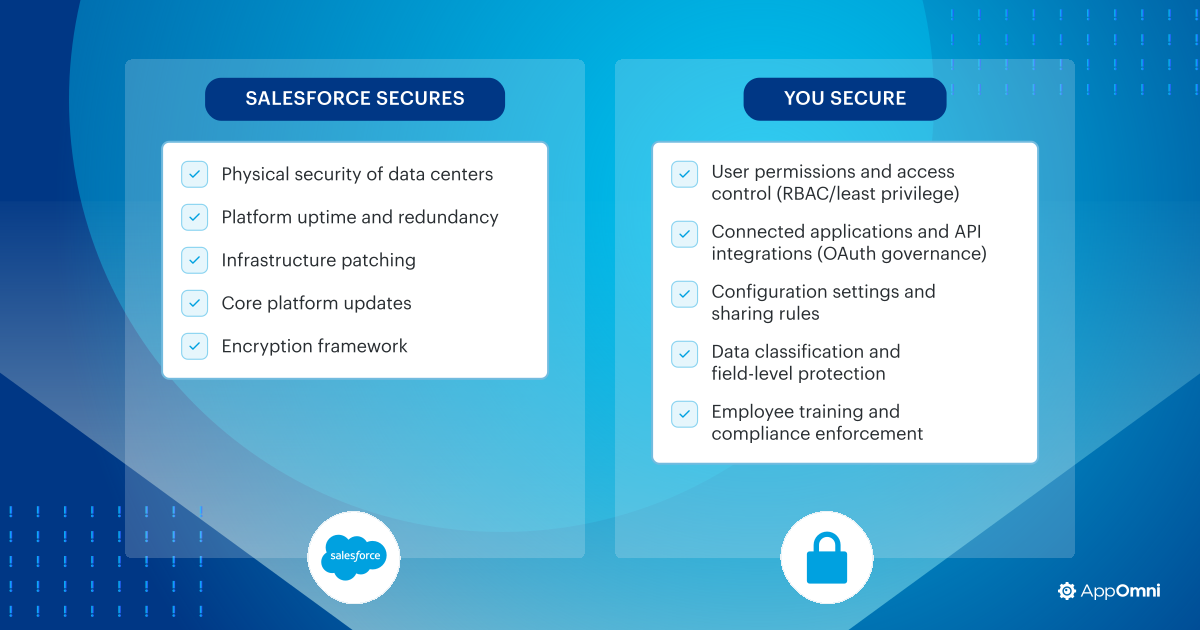
Salesforce secures the platform itself: the infrastructure, service availability, and the core software. But it doesn’t secure how your organization uses the platform. That’s your responsibility.
In the shared responsibility model, Salesforce secures the underlying SaaS infrastructure, while customers secure how their data, users, integrations, and configurations operate within it.
But the scope of the security provided by Salesforce is commonly misunderstood. Security teams often assume that Salesforce’s built-in controls, including Health Check and Shield, automatically protect the data stored inside it. However, Salesforce doesn’t protect against cross-application risks or configuration drift, which can lead to data exposure, unauthorized access, or compliance failures. Protecting that data depends on how the environment is configured and actively managed.
Once you understand where your responsibility begins, the next step is building practical safeguards around it.
Step 1: Start with Salesforce identity access management
Over-permissioned users are the most common source of SaaS data exposure—and Salesforce is no exception.
Salesforce environments include more than 360 configurable permissions, layered across profiles, roles, permission sets, and sharing rules. This complexity makes it difficult to know exactly who has access to what at any given moment. Over time, privileges accumulate: users get higher levels of access for projects or for temporary assignments, and those permissions often stick around long after they’re no longer needed.
Security teams need to regularly audit high-risk administrative permissions, including:
- View All Data
- Modify All Data
- Manage Users
- Modify Metadata
- Author Apex
Best practice: Apply role-based access control (RBAC) and least-privilege principles so that users have access only to what their role actually requires at any given time. Review and remove inactive users, time-bound access, and unnecessary privileges on a regular schedule. Getting identity and access right first reduces the most common pathways to data exposure before you address anything else.
Step 2: Master the basics of Salesforce security and practice good hygiene
Even well-managed Salesforce environments can drift away from secure configurations over time. Administrators add integrations, enable features for business teams, and adjust settings to support changing workflows. Small changes like these can weaken security controls if no one monitors and manages them.
Best practice: Salesforce’s Health Check tool evaluates key configuration settings against recommended security baselines and surfaces issues that need attention. Run it regularly, and pay particular attention to high-risk settings: application programming interface (API) access controls, data export permissions, and guest user access. These features can expose large volumes of data if they’re not carefully restricted. Automated drift monitoring helps ensure that both production and sandbox environments stay consistent, so that unexpected changes don’t slip through unnoticed.
| Run a Salesforce Health Check today. Use AppOmni’s Salesforce Security Health Check to identify configuration risks across your environment. → |
Step 3: Protect against risks targeting Salesforce’s low-code ecosystem
Salesforce’s low-code and industry cloud tools make it faster than ever to build new functionality directly within the platform. Components like FlexCards, Data Mappers, OmniScripts, and custom Lightning applications enable teams to automate workflows and integrate data without touching traditional code—but with that speed and efficiency comes risk.
AO Labs research has identified more than 20 exploitable patterns in Salesforce low-code environments, resulting in five CVEs. These include cases where field-level security checks were bypassed, cached responses exposed data shared among users, and credentials were hardcoded into configuration logic.
Custom Salesforce applications carry similar exposure. Poorly designed access controls or misconfigured integrations allow attackers to retrieve records or interact with backend services without proper authorization. Research from Dark Reading and AppOmni has documented cases where misconfigured custom applications exposed corporate data at scale.
In one case, an automotive manufacturer accidentally leaked API credentials for its Salesforce Marketing Cloud for more than 18 months, exposing customer phone numbers and email addresses to potential misuse. In another incident, a pharmaceutical company’s highly privileged employee left Salesforce credentials on a public code repository for over a year, exposing a cloud environment containing patient data and raising compliance concerns. In a third example, a U.S. state government and a regional bank each inadvertently exposed personally identifiable information—including Social Security numbers—through a misconfigured Experience Cloud instance.
As AI agents and automation tools become more embedded in Salesforce environments, the attack surface expands further. AO Labs research identified agentic AI vulnerabilities that led to the development of AgentGuard, which was built to detect and prevent prompt injection and agent-to-agent exploitation within SaaS environments. Organizations exploring Salesforce Agentforce or similar AI automation should account for how these risks impact their security posture.
Best practice: Treat low-code components and custom applications with the same discipline as production code: test configurations, enforce field-level security, review integrations regularly, and patch components when vulnerabilities are found.
Step 4: Prevent SaaS-to-SaaS risk and OAuth abuse
Salesforce environments rarely operate in isolation. Marketing platforms, analytics tools, automation services, and dozens of other SaaS applications connect through APIs and OAuth-based integrations. These connections make it easy to share data and automate workflows, but they also open up new attack vectors. Increasingly, threat actors target OAuth integrations rather than Salesforce itself.
Recent Salesforce security incidents
Three recent campaigns illustrate the severity of these risks:
- UNC6040 (ShinyHunters), the dataloader[.]io attack: Attackers used voice phishing to trick users into authorizing a rogue application disguised as a legitimate data tool. Once approved, the application used OAuth permissions to access and exfiltrate Salesforce records through the API. This type of Salesforce OAuth attack is increasingly common and difficult to detect without proper API access controls.
- Drift breach, UNC6395: A SaaS supply chain attack exploited a Salesforce-connected vendor. The breach demonstrated how attackers can pivot from a third-party integration directly into a Salesforce environment containing sensitive customer and operational data.
- Salesforce GraphQL data extraction campaign: Threat actors scanned public Salesforce Experience Cloud sites for misconfigured guest user permissions. Using modified security tooling, such as AuraInspector, attackers queried Salesforce’s GraphQL interface to extract exposed records at scale when anonymous access controls were overly permissive.
These are not rare cases; they reflect a repeatable playbook attackers are actively running against Salesforce customers.
Best practice: To reduce this risk, enable Salesforce API Access Control to block unapproved applications by default. Review all connected applications regularly, include only trusted integrations on your allow list, and require administrator authorization. Train IT to recognize suspicious authorization requests, particularly unexpected calls or messages asking them to approve application access.
Step 5: Strengthen data visibility, encryption, and auditing
Protecting Salesforce data requires clear visibility into how it’s accessed and used across the platform, along with the right tools to enable you to act on what you see.
Salesforce Shield provides the foundational capabilities:
- Platform Encryption protects sensitive fields and records at rest
- Event Monitoring creates visibility into user and application behavior
- Field Audit Trail maintains detailed records of data changes over time.
Salesforce Shield 2.0 builds on these capabilities with enhanced data detection and response features, giving security teams greater control over how sensitive data is classified, monitored, and acted upon across complex environments.
Pairing Shield with a SaaS security posture management (SSPM) platform strengthens Salesforce security further. It enables continuous compliance mapping, cross-application visibility, and automated detection of anomalous activity. These are things Shield alone can’t provide.
Best practice: Ensure that your security team monitors event logs regularly, flags mass data downloads or privilege escalation, and integrates Salesforce telemetry with centralized platforms like Splunk or Elastic. Broader visibility means faster incident detection and stronger control over sensitive business data.
Step 6: Maintain continuous security and compliance
Securing Salesforce isn’t a one-time configuration exercise. Environments evolve and expand constantly. New users, integrations, custom applications, and automation get added all the time. Each change introduces the potential for configuration drift, permission sprawl, or new integration risk. Without continuous oversight, those small changes gradually erode your security posture before anyone notices.
Organizations need to establish ongoing review processes that monitor permissions, configuration settings, and connected applications across the Salesforce environment. Automated policy checks against frameworks like NIST 800-53, ISO 27001, SOX, or HIPAA help ensure compliance enforcements as environments evolve.
Frequently asked questions about Salesforce security
Is Salesforce secure by default?
Salesforce secures its own platform infrastructure, but organizations must secure how Salesforce is configured and used. Misconfigurations, excessive permissions, and risky integrations can expose sensitive data.
How often should Salesforce security be audited?
Security teams should implement continuous monitoring rather than relying on periodic audits.
What’s the biggest Salesforce security risk?
Over-permissioned users remain one of the most common risks in Salesforce environments because they allow unnecessary and often unsanctioned access to sensitive data.
From health check to continuous confidence
Salesforce holds some of the most valuable data in your enterprise. Protecting it requires more than enabling a few security settings.
Strong Salesforce security comes from understanding your shared responsibility, applying disciplined identity and configuration management, governing integrations carefully, and maintaining clear visibility into how data moves across your environment. Native tools like Health Check and Shield provide an important foundation. As your environment grows and integrations expand, continuous monitoring and governance are what keep you ahead of emerging threats.
Technical controls are only part of the equation. Regular user awareness and administrative training are equally important for defending against social engineering and evolving SaaS threats.
For deeper visibility into Salesforce security risks, explore how AppOmni helps enterprises maintain control across complex SaaS environments.
Salesforce Security Checklist
Learn how to manage SaaS risk in Salesforce with security controls. Includes a downloadable checklist.
Read more: Salesforce Security Assessment Checklist